Sewayojan UP (Rojgaar Sangam) — Registration, Login & Bhatta
Sewayojan, उत्तर प्रदेश सरकार के Department of Training & Employment का official employment portal है, जो NIC द्वारा sewayojan.up.nic.in पर host किया गया है। Portal अब officially Rojgaar Sangam, U.P. / सेवायोजन विभाग, उ0प्र0 के रूप में branded है। यह page registration, login, job search, Berojgari Bhatta, helpline, और common problems के fixes — सब कुछ official portal से verified — cover करता है।
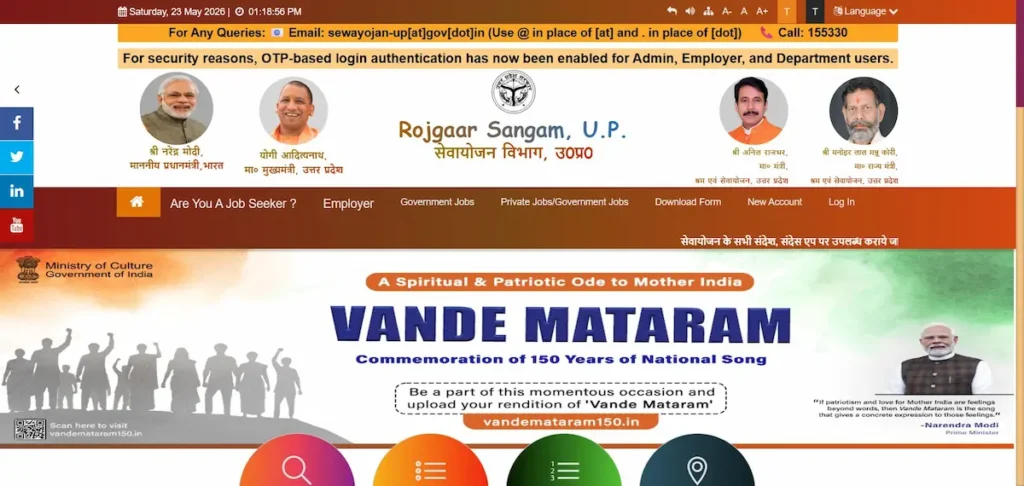
Sewayojan क्या है? (Quick Overview)
| Detail | Information |
|---|---|
| Portal Name | Sewayojan / Rojgaar Sangam, U.P. |
| Department | Department of Training & Employment, Government of Uttar Pradesh |
| Official Website | sewayojan.up.nic.in |
| Official Email | sewayojan-up@gov.in |
| Helpline | 0522-2630690 |
| Office | Guru Govind Singh Marg, Bans Mandi Chauraha, Lucknow, UP |
| User Roles | Jobseeker, Employer, सेवा मित्र (Sewa Mitra) |
| Registration Fee | Free (₹0) |
| Hosted By | National Informatics Centre, Uttar Pradesh |
| Services | Online registration, job search, Berojgari Bhatta application |
Sewayojan (सेवायोजन, अर्थात् employment facilitation) UP का online employment exchange है। Portal के header पर अब Rojgaar Sangam, U.P. current branding के रूप में दिखता है — यह वही portal है, वही login, वही database. Government jobs, private vacancies, और unemployment allowance applications यहीं handle होती हैं।
यह portal हर qualification level के लोगों के लिए है — 10th, 12th, ITI, diploma, graduate, post-graduate. Employers भी verified candidates ढूँढने के लिए register करते हैं। Sewayojan registration अनिवार्य है अगर आप portal से job apply करना चाहते हैं या Berojgari Bhatta लेना चाहते हैं।
Sewayojan, Rojgaar Sangam, Seva Yojana — क्या ये एक ही हैं?
हाँ — Sewayojan और Rojgaar Sangam एक ही portal हैं। Rojgaar Sangam sewayojan.up.nic.in पर current official branding है; “Sewayojan” पुराना, व्यापक रूप से search किया जाने वाला नाम है जो लोग आज भी Google में type करते हैं।
Users जो common variants search करते हैं: seva yojana, seva yojna, sewa yojana, rojgar sangam, rojgaar sangam, रोजगार संगम. सब यहीं point करते हैं। Rojgar Seva employment services का generic term है — कोई अलग portal नहीं।
सेवायोजन पोर्टल पर रजिस्ट्रेशन कैसे करें — Step-by-Step (Verified)
Sewayojan पर register करने के लिए sewayojan.up.nic.in खोलिए, top menu से New Account → Jobseeker चुनिए, form में नाम, Aadhaar number, mobile, email, DOB और gender भरिए, एक User Id और password बनाइए, Aadhaar OTP verify कीजिए.
पहले यह ready रखिए:
- Aadhaar number (active, mobile linked for OTP)
- Active mobile number
- Working email ID
- Passport-size photo (digital copy)
- Educational certificates
- Caste / income / domicile certificate (अगर reserved category या Berojgari Bhatta के लिए apply कर रहे हैं)
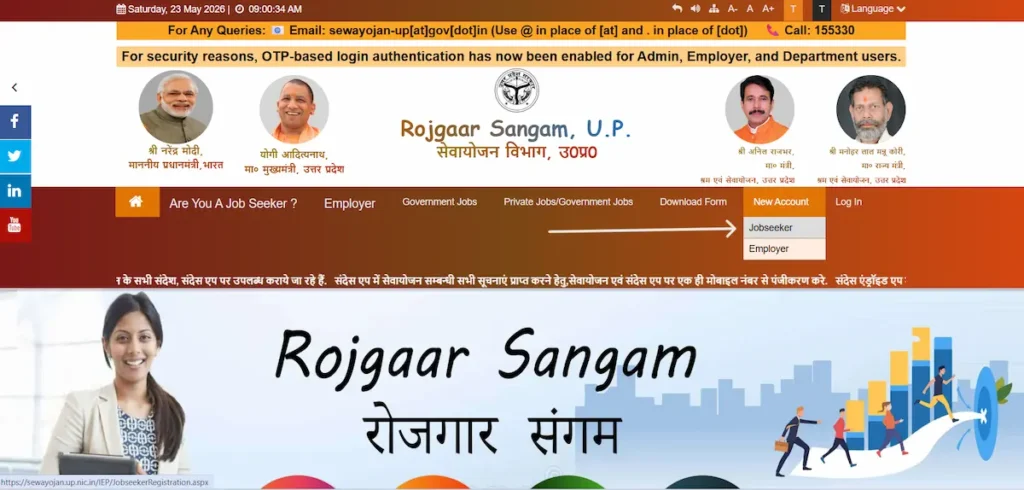
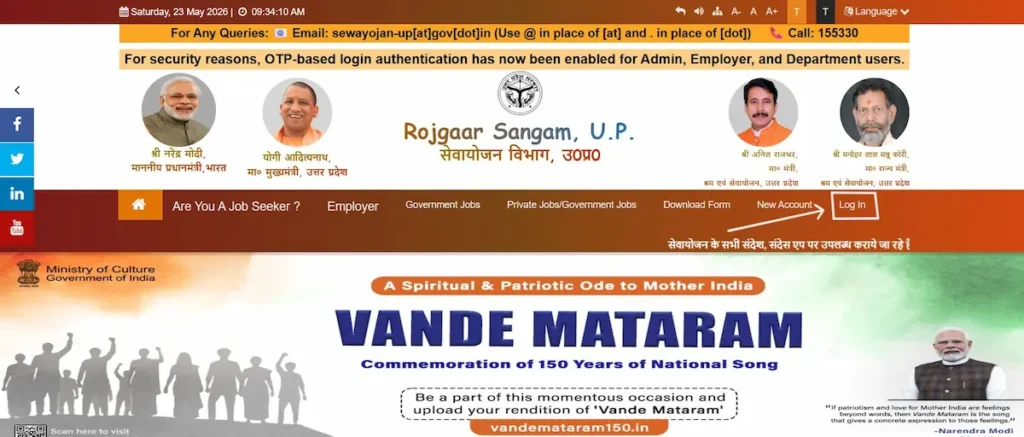
- Step 1 — Official portal खोलिए। sewayojan.up.nic.in पर जाइए। Top menu में New Account पर hover करके Jobseeker select कीजिए। किसी third-party “registration link” का use मत कीजिए — सिर्फ official URL.
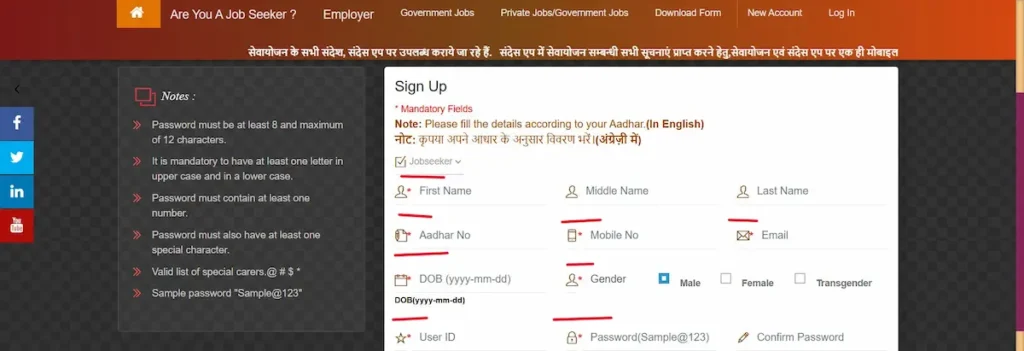
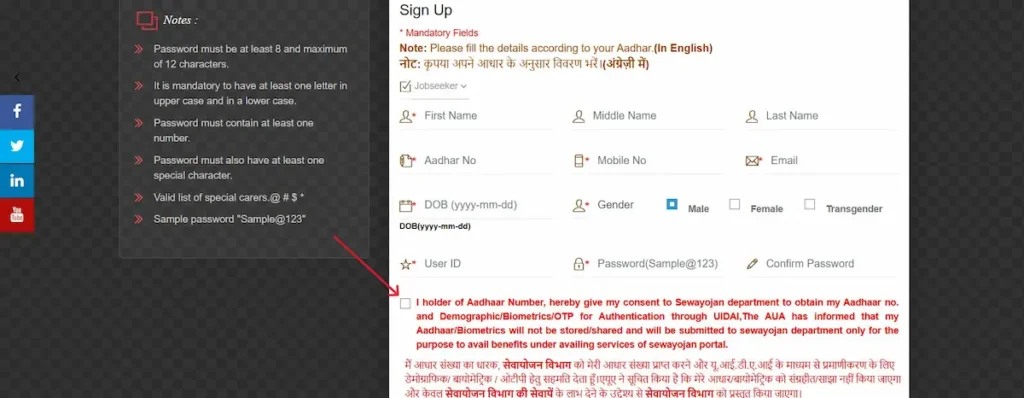
- Step 2 — Signup form भरिए। * वाले fields mandatory हैं। Aadhaar के according, English में:
- First Name
- Aadhar No.
- Mobile No.
- Email Id
- DOB (format
yyyy-mm-dd) - Gender (Male / Female / Transgender)
- User Id (आप खुद choose करेंगे)
- Password (rules नीचे)
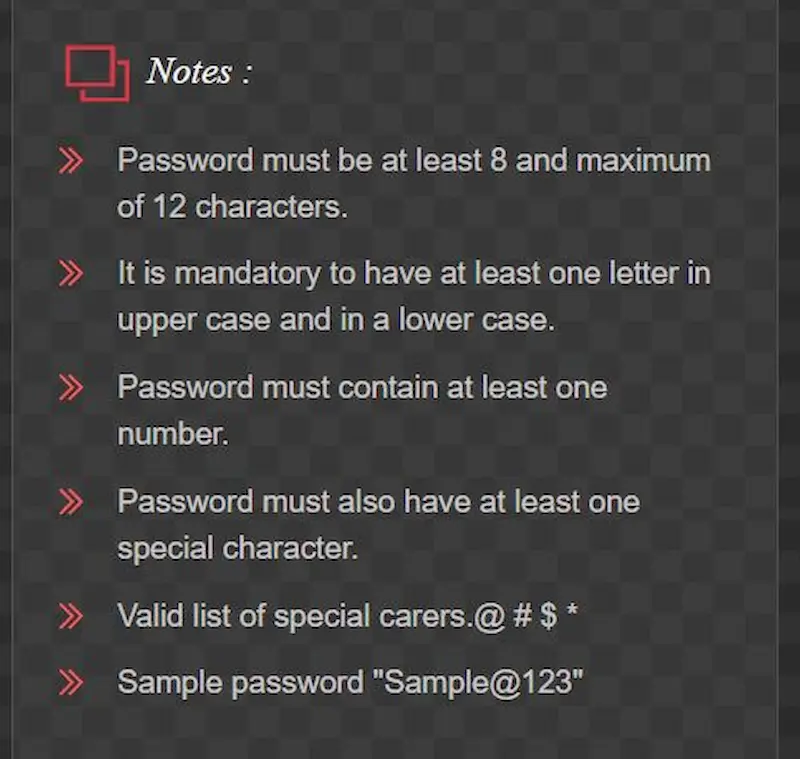
- Step 4 — Password rules (official portal से)। Portal के signup page पर यह rules display होते हैं:
- 8 to 12 characters
- At least one uppercase letter
- At least one lowercase letter
- At least one number
- At least one special character
- Valid special characters: @ # $ *
- Example: Sample@123
- Step 5 — Aadhaar consent दीजिए। UIDAI authentication (demographic / biometric / OTP) का consent checkbox tick कीजिए।
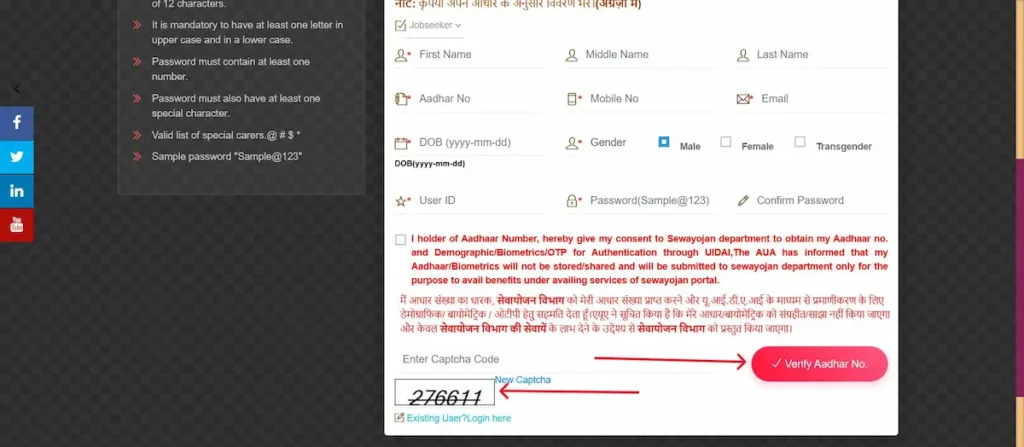
- Step 6 — Captcha solve कीजिए। Simple math captcha आएगा (जैसे
80 + 75 =)। Answer भरिए और Verify Aadhar No. button पर click कीजिए। - Step 7 — Aadhaar OTP verification. आपके Aadhaar-linked mobile पर OTP आएगा। Enter करके submit कीजिए। अगर Aadhaar-linked mobile बंद है, पहले nearest Aadhaar Seva Kendra पर update करवाइए — Sewayojan इसको bypass नहीं कर सकता।
- Step 8 — Login करके profile complete कीजिए। User Id और password से login कीजिए। Dashboard पर 9 official sub-sections मिलेंगे:
- Personal Info (व्यक्तिगत जानकारी) — name, parents’ names, marital status, religion, photo
- Contact (संपर्क) — address, state, district, tehsil, block, village, PIN code
- Physical (भौतिक) — height, weight, blood group, eyesight
- Education (शिक्षा) — 10th onwards qualifications
- Language / Education Knowledge (भाषा) — read, write, speak
- Skills (कौशल) — technical और soft skills
- Experience (अनुभव) — past employment
- Preference (वरीयता) — preferred job area, type, salary
- Declaration (घोषणा) — verify और submit
- Step 9 — X-10 Report print कीजिए। Final submission के बाद X-10 Report download और print कीजिए। यह आपका registration proof है — Rojgar Mela और Berojgari Bhatta verification में माँगा जाता है।
Sewayojan Login — Step-by-Step
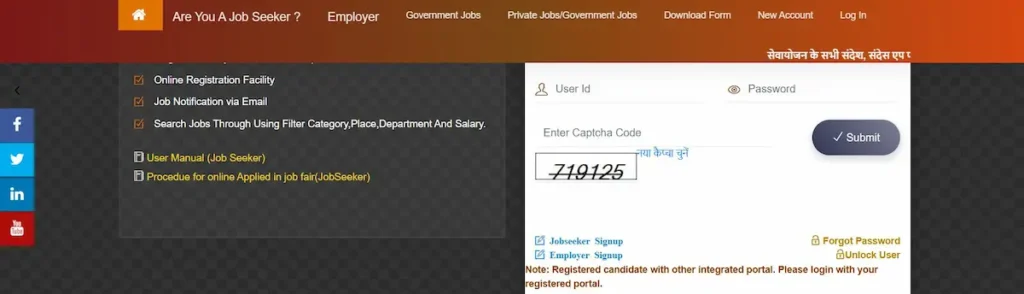
Sewayojan login करने के लिए sewayojan.up.nic.in/IEP/Login.aspx पर जाइए, अपना role (Jobseeker, Employer, Sewa Mitra, या Departmental Officer) चुनिए, User Id और Password दीजिए, captcha solve कीजिए, Submit करें।
- sewayojan.up.nic.in खोलिए।
- Top menu में Log In पर click कीजिए (या direct
/IEP/Login.aspx)।
- Role चुनिए: Jobseeker, Employer, Sewa Mitra, या Departmental Officer.
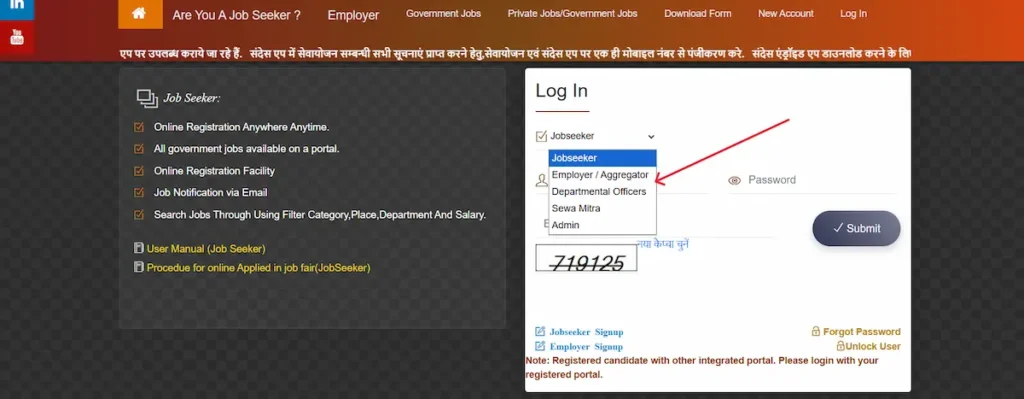
- User Id और Password enter कीजिए।
- Captcha solve कीजिए।
- Submit पर click कीजिए। Dashboard खुल जाएगा।
Login problem आ रहा है?
- Login fail हो रहा है? Caps Lock check कीजिए — password case-sensitive है।
- User Id या password भूल गए? Forgot Password flow use कीजिए।
- Captcha बार बार refresh हो रहा है? Browser change कीजिए, या
.nic.inके cookies clear कीजिए। - Account locked दिखा रहा है? 15-30 minute wait करके retry कीजिए।
Documents Required for Sewayojan Registration
Registration के लिए mandatory:
- Aadhaar card (linked mobile के साथ)
- Active mobile number
- Email ID
- Passport-size photo (digital)
Full profile और job application के लिए:
- Educational certificates (10th onwards)
- Signature (digital)
Berojgari Bhatta application के लिए additionally:
- Caste certificate (if applicable)
- Income certificate (family income proof)
- Domicile / residence certificate (UP)
- Bank account details (DBT के लिए)
Note: District employment office पर physical verification के time Voter ID या Ration Card supplementary address proof के रूप में माँगा जा सकता है।
पासवर्ड या User ID भूल गए? (Forgot Password / User ID Recovery)
Sewayojan password या User Id recover करने के लिए login page पर Forgot Password / Forgot User ID option use कीजिए, role select कीजिए, registered mobile या email पर OTP receive कीजिए, और नया password set कीजिए।
- Login page पर Forgot Password / Forgot User ID click कीजिए।
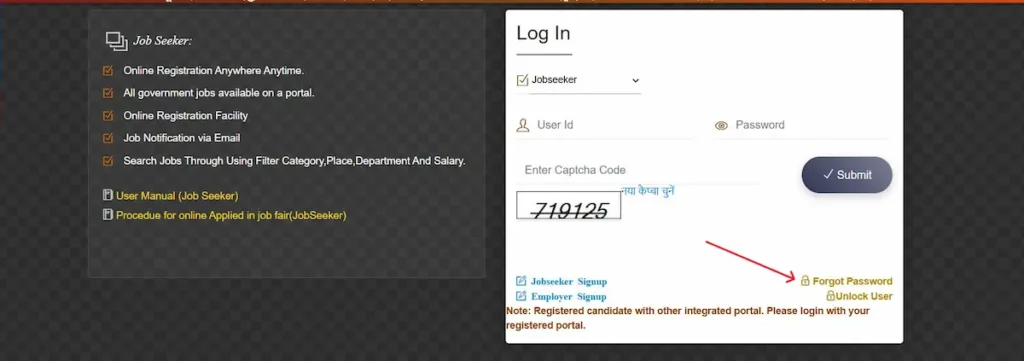
- Role चुनिए: Jobseeker, Employer, Sewa Mitra, या Departmental Officer.
- Registered Mobile Number या Email ID enter कीजिए।
- Captcha solve करके OTP request कीजिए।
- Received OTP enter कीजिए।
- नया password set कीजिए या recovered User Id note कर लीजिए।
- Save पर click करके नई credentials से login कीजिए।
OTP नहीं आया? SMS-blocking apps check कीजिए, signal confirm कीजिए, 60 second बाद re-request कीजिए। अगर registered mobile permanently बंद हो गया है, district employment office में physically जाना पड़ेगा।
Jobs कैसे ढूंढें — Job Search on Sewayojan
Aanswer: Login के बाद Sewayojan पर चार categories में jobs search की जा सकती हैं: Government Jobs, Private Jobs, Outsource Jobs, और Rojgar Mela Jobs. हर category में district, qualification, salary, और sector के filters हैं।
Government Jobs (सरकारी नौकरी) — UP government departments द्वारा post की जाती हैं। Filters: Post, Department, District/Janpad, Recruitment Type, Recruitment Group, Post Type. Direct URL: sewayojan.up.nic.in/GovernmentJob.aspx.
Private Jobs (निजी नौकरी) — Registered private employers UP भर से vacancies post करते हैं। Filters: Department, Salary Limit, Job Type, District, Qualification, Sector.
Outsource Jobs (आउटसोर्स) — Outsourcing agencies द्वारा fill की जाने वाली posts. District-level support roles में common हैं।
Rojgar Mela Jobs (रोजगार मेला) — Scheduled employment fairs के through offered jobs. Specific mela के लिए अलग से register करना पड़ता है।
Practical tips:
- Profile updated रखिए — recruiters latest version देखते हैं।
- Dashboard से SMS और email alerts on कर लीजिए।
- Government Jobs और Private Jobs URLs browser में bookmark कीजिए।
Rojgar Mela (Employment Fair) — What It Is and How to Join
Rojgar Mela UP Employment Department द्वारा organise किया गया scheduled employment fair है जहाँ multiple employers एक ही venue पर on-the-spot interviews लेते हैं। Sewayojan registration अनिवार्य है।
कैसे काम करता है। Department upcoming melas की notification portal पर और registered mobile पर भेजता है। आप अपने dashboard से specific mela के लिए register करते हैं। Mela के दिन venue पर X-10 Report और documents लेकर पहुँचते हैं।
अपने district का mela कैसे ढूँढें। Login के बाद dashboard में Rojgar Mela section check कीजिए। Melas district level पर होते हैं — Lucknow, Kanpur, Varanasi, Agra, Prayagraj, Meerut, Ghaziabad, Gautam Buddha Nagar (Noida), Bareilly, Aligarh, Moradabad, Saharanpur, Gorakhpur, Ayodhya, Jhansi, Mathura, Muzaffarnagar, और बाकी major districts.
क्या लेकर जाना है। Printed X-10 Report, educational certificates (original + photocopies), Aadhaar, recent photos, और updated resume. Interview के लिए dress कीजिए — बहुत employers same-day shortlist करते हैं।
Berojgari Bhatta (Unemployment Allowance) — Eligibility, Amount & How to Apply
Berojgari Bhatta UP government की monthly allowance है जो Sewayojan पर registered educated, unemployed youth को दी जाती है। UP Department of Training & Employment के according, allowance generally ₹1,000-₹1,500 per month रहती है। Eligibility में UP residency, age 21-35 years (notification के according relaxation possible), और family income ceiling शामिल हैं।
Note: Allowance amount और exact eligibility UP Department of Training & Employment द्वारा समय समय पर revise की जाती है। Apply करने से पहले current notification sewayojan.up.nic.in पर या अपने district employment office पर confirm कर लीजिए।
Eligibility (general — current notification के अधीन):
- UP का permanent resident
- Age generally 21-35 years (कुछ notifications में 18-35 भी; current verify कीजिए)
- Minimum qualification 10th या 12th (notification के according)
- Currently unemployed (किसी salaried job या full-time education में नहीं)
- Family income ceiling से नीचे (commonly ₹3 lakh per year)
- Sewayojan पर registered with completed profile
Bhatta के लिए specific documents:
- Domicile certificate
- Family income certificate
- Caste certificate (reserved-category benefit के लिए)
- Aadhaar-linked bank account details (DBT के लिए)
Apply कैसे करें:
- Sewayojan registration और full profile complete कीजिए।
- Login करके dashboard में Berojgari Bhatta application section open कीजिए।
- Auto-filled personal details, qualifications, और address verify कीजिए।
- Bhatta-specific documents upload कीजिए।
- Declaration submit कीजिए।
- Status dashboard से track कीजिए। Approval के बाद payment DBT (Direct Benefit Transfer) के through Aadhaar-linked bank account में आता है।
Payment कब रुकती है। Scheme rules के according, employment मिलने पर आपको Employment Department को defined time-window में inform करना mandatory है। Job लगने के बाद भी allowance लेना fraud माना जाता है और recovery proceedings हो सकती हैं।
Common rejection reasons:
- Aadhaar details और profile data में mismatch
- Unrecognised authority से issued income certificate
- Incomplete profile या missing documents
- PAN/EPFO के through traceable existing employment record
Common Problems & Fixes (Troubleshooting Hub)
- OTP नहीं आया। Signal check कीजिए, SMS-blocking apps disable कीजिए, confirm कीजिए कि mobile वही है जो Aadhaar से linked है। 60 seconds बाद re-request कीजिए। अगर Aadhaar-linked mobile inactive है, पहले Aadhaar Seva Kendra पर update करवाइए।
- Photo upload error. File JPG या PNG में होनी चाहिए, upload field पर दिखाई गई size limit के अंदर। Photo को lower resolution पर re-save कीजिए। Standard passport ratio (3.5cm × 4.5cm) में crop कीजिए।
- Aadhaar verification fail हो रहा है। सबसे common reason — Aadhaar और form के नाम या DOB में mismatch. Spelling, DOB format (yyyy-mm-dd), और Aadhaar active है या नहीं, दोबारा check कीजिए।
- Captcha बार बार reload हो रहा है। Browser switch कीजिए, .nic.in domain के लिए strict ad-blockers disable कीजिए, cookies allow कीजिए।
- Account locked. Multiple failed logins के बाद 15-30 minutes wait कीजिए। फिर भी locked है तो Forgot Password से reset कर लीजिए।
- Profile save नहीं हो रही। 9 profile sections order में complete करने पड़ते हैं — बीच में skip नहीं कर सकते। पहले Personal Info, फिर Contact, ऐसे आगे।
- X-10 Report print नहीं हो रहा। Browser के Print Preview से directly print कीजिए। Printer नहीं है तो Save as PDF कर लीजिए — district offices PDF accept करते हैं।
- Mobile number change करना है। Login करके profile में mobile change request कीजिए — पुराने और नए दोनों numbers पर OTP verification होता है। अगर पुराना number permanently lost है, ID लेकर district employment office जाइए।
- Registration 3 साल पुरानी हो गई। Sewayojan registration generally 3 years बाद renewal माँगती है। Expiry के करीब dashboard में renewal link आता है। Time पर renew कीजिए — वरना mela और bhatta access रुक सकता है।
Sewayojan Karyalay (Office) & Helpline
Headquarters — Lucknow:
- Address: Guru Govind Singh Marg, Bans Mandi Chauraha, Lucknow, Uttar Pradesh
- Helpline: 0522-2630690
- Email: sewayojan-up@gov.in
- Hours: Monday से Friday, 10:00 AM से 6:00 PM
District Employment Offices (Jila Sewayojan Karyalay). UP के हर district में Department of Training & Employment का अपना office है। यह offices in-person verification, document submission, bhatta-related queries, और renewal handle करते हैं। District office पर जाइए:
- जो issues online resolve नहीं हो रहे
- Mobile number change जब पुराना number lost हो
- Bhatta payment queries
- Select recruitments के लिए physical verification
District offices की official list department के पास maintained है। अपने specific district office का current address और timing Lucknow helpline (0522-2630690) से confirm कर लीजिए।
Sewayojan in Other States?
Sewayojan सिर्फ Uttar Pradesh के लिए है — दूसरे states के residents को अपने state का employment portal use करना होगा।
- Maharashtra (Mumbai, Pune, Nagpur, etc.) — mahaswayam.gov.in
- Bihar — Bihar State Employment Portal
- Rajasthan — Rajasthan Employment Department portal
- Any state / National — National Career Service (ncs.gov.in)
Employer & Sewa Mitra Roles
Employer Registration. Private companies और government departments Sewayojan पर Employer के रूप में register करके vacancies post कर सकते हैं और registered candidate pool access कर सकते हैं। sewayojan.up.nic.in के top menu में New Account से Employer select करके signup होता है। Employer verification (PAN, registration certificate, contact verification) signup का हिस्सा है। Verified employers job post करते हैं और shortlist करते हैं।
Sewa Mitra. Sewa Mitra एक अलग user role है — official signup form पर तीसरा button. यह UP की specific service-delivery schemes के assigned mitras के लिए है। अगर आप general job या Berojgari Bhatta के लिए apply कर रहे हैं, Sewa Mitra select मत कीजिए — Jobseeker चुनिए। Sewa Mitra registration सिर्फ state service-delivery framework के under assigned roles के लिए है।
Related UP Employment Schemes
- Mukhyamantri Yuva Swarozgar Yojana — UP scheme जो youth को अपना enterprise start करने के लिए loan और subsidy support देती है। Bhatta या job wait करने के बजाय self-employment चाहने वाले graduates के लिए natural next step।
- UP Outsourcing Corporation (UPCOS) recruitments — UP government departments में contractual postings. Sewayojan के Outsource Jobs section में regularly post होती हैं।
- National Career Service (NCS) — Central government का pan-India employment portal ncs.gov.in पर। Sewayojan UP cover करता है; NCS उन लोगों के लिए useful है जो UP के बाहर भी opportunities खोज रहे हैं।
- Sandes App — Official secure messaging app जहाँ अब Sewayojan notifications भी deliver होती हैं। अपना Sewayojan-registered mobile number Sandes पर register कर लीजिए — सारी alerts वहाँ भी मिलेंगी।
Frequently Asked Questions
Quick Reference Links
| Service | Direct URL |
|---|---|
| Official Portal | sewayojan.up.nic.in |
| Jobseeker Registration | sewayojan.up.nic.in/IEP/JobseekerRegistration.aspx |
| Employer Registration | sewayojan.up.nic.in/IEP/registration.aspx |
| Login | sewayojan.up.nic.in/IEP/Login.aspx |
| Government Jobs | sewayojan.up.nic.in/GovernmentJob.aspx |
| Private & Government Jobs | sewayojan.up.nic.in/jobs.aspx |
| Forgot Password | sewayojan.up.nic.in/IEP/forgetpassword.aspx |
| Police Verification Form (PDF) | sewayojan.up.nic.in/GMJS/PoliceVeri.pdf |
| Privacy Policy (Official PDF) | sewayojan.up.nic.in/Images/privacypolicy-sewayojan.pdf |
| UP Cyber Security Guidelines | sewayojan.up.nic.in/IEP/NEWS/CCGLines.pdf |
About This sewayojaan.com Information Platform
sewayojaan.com is an independent information platform offering verified, step-by-step guidance on UP Sewayojan portal services — sourced and cross-checked against sewayojan.up.nic.in.
Learn Sewayojan the Right Way • Avoid Fake Portals • Stay Informed on UP Updates
Last verified: 23 May 2026